


Bark - Parental Controls
3.92.34K Reviews
App Specs
- Version
- 6.5.1
- Updated On
- License
- Free
- Downloads
- 500,000+
- Developer
- Bark Technologies, Inc.
- Categories
- Parenting
- Platform
- Android, iOS
Screenshots


 Analysis by AppCompare
I look at Bark - Parental Controls as a tool for starting better conversations, not as a substitute for them. Its focus is on spotting possible concerns across a child’s online life, which can be more useful than checking one app at a time. That distinction matters: parents who want a complete transcript of every conversation may find this approach too limited, while families trying to notice warning signs without reading every message may find it a better fit.
What to expect from its speed
For an app like this, I wouldn’t judge speed by how quickly a screen opens alone. The important question is whether alerts arrive in time to help a parent respond thoughtfully. Bark is designed to surface potential issues rather than turn every online interaction into a notification, so I’d treat an alert as a prompt to check in, not as a live feed or proof that something has happened.
That selective approach has a trade-off: it can reduce noise, but automated detection can misunderstand context. A joking exchange, a quoted phrase, or a discussion about a difficult topic might need a parent’s judgment before it means anything. I’d avoid reacting to a notification in front of a child as if it were a verdict. A calm question and a look at the situation together are more useful than treating an automated flag as the whole story.
When online activity gets busy
The app’s value is easiest to understand during ordinary, crowded weeks: school messages, social conversations, and the steady pull of entertainment apps can all compete for a young person’s attention. If a parent already has a routine for checking in, Bark can give that routine a clearer starting point. For example, an alert about a worrying exchange could lead to a private conversation after school rather than an immediate confrontation while a child is with friends.
Screen-time controls can also help with predictable transitions. I’d set expectations with a child before using a bedtime or homework schedule, then review whether it actually fits the household’s routine. A rule that blocks an app at the wrong moment may create friction without improving focus. The practical tip is to begin with one recurring problem, such as late-night scrolling, and make only that boundary part of the first trial.
Reliability means using judgment
No monitoring system can interpret a family’s full context perfectly. Bark’s alerts may help bring a concern to a parent’s attention, but they do not replace listening to the child, checking what happened, or seeking appropriate support when a serious issue arises. I would also agree in advance on what the app is for and what a child can expect a parent to do after an alert. That conversation can make monitoring feel less like a secret investigation and more like a shared safety plan.
If an alert seems unclear, I’d avoid making a major decision from a single notification. Look for context, ask an open question, and distinguish between an uncomfortable topic and an immediate safety concern. This is particularly important around emotional health: a monitoring tool can point to something worth discussing, but it cannot diagnose depression or tell a parent exactly what kind of help a young person needs.
Worth Reading Before You Choose

EA SPORTS FC Mobile 26 Is a Bigger Football Game, but It Takes Time

Flipboard Shows What News Apps Must Do Beyond the Feed

Switching to Android Auto Means Rethinking Your Driving Routine

Google Calendar Makes a Crowded Week Easier to Manage

Ludo King Makes the Most of the Minutes Between Plans

Baby Panda World Brings Quick Play to Modern Phones, but Its Game Library Feels Busy
Device fit and household expectations
Bark is a parenting app from Bark Technologies, Inc. It is free, rated for Everyone, and has an average rating of 4.2 from around 10,000 ratings, with more than 2,000 written reviews and over 500,000 installs. It was released in November 2016, and version 5.6.16 requires Android 6.0 or later. Those details make it easier to judge basic Android compatibility, but a minimum operating-system requirement does not guarantee that every device or setup will behave identically.
Before depending on it, I’d check that the parent’s phone and the child’s devices meet their relevant requirements and that the family can complete the intended setup. If a device is shared, used for school, or managed by another adult, agree on the boundaries first; otherwise, a control that sounds sensible at home can cause confusion elsewhere. Families using iPhones should check the current Apple listing and setup guidance before making a decision, rather than assuming that Android requirements apply there too.
Who will get the most from it
I think Bark is best suited to parents who want an additional way to notice potential online risks while keeping room for a child’s privacy. It may be especially useful when a young person uses several social channels and a parent wants help deciding when to check in. It is less suitable for someone who expects a complete record of every message, a guarantee that every risky interaction will be caught, or a replacement for an honest conversation about online behavior.
Compared with relying only on a phone’s built-in screen-time settings, Bark’s appeal is its attention to possible safety concerns across online communication, rather than just time limits and app access. Built-in controls can be the better choice if the only problem is bedtime use or a simple device schedule. Conversely, manually checking a child’s accounts gives a parent direct context but can feel intrusive and demands regular effort. Bark sits between those approaches: it can draw attention to possible issues, while the parent still has to decide what they mean and how to respond.
The First Look
Setting up Bark - Parental Controls was surprisingly straightforward. With a few taps, I had it linked to my child's devices. The app boasts a sleek interface that even a tech newbie can navigate with ease. It's like the developers knew parents needed something stress-free in their already hectic lives!
Features Worth Barking About
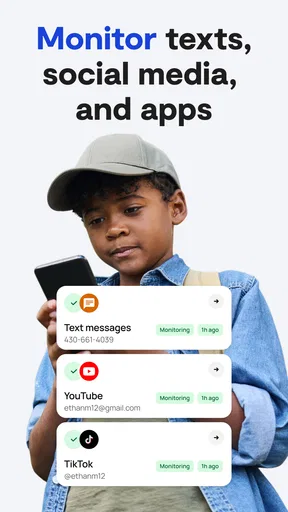
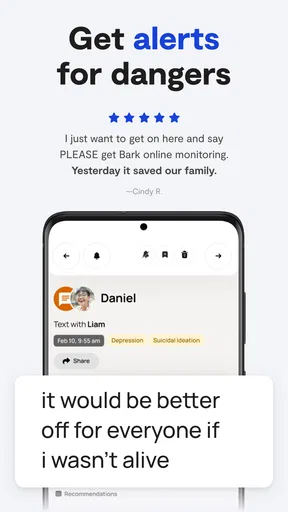
The app monitors a wide array of platforms—think social media, emails, and texts. It’s like having a personal assistant that keeps an eye on everything your teen is up to online. Bark sends you alerts for potential issues like cyberbullying, inappropriate content, or even signs of depression. It's a real lifesaver for parents who want to stay in the loop without being helicopter parents.
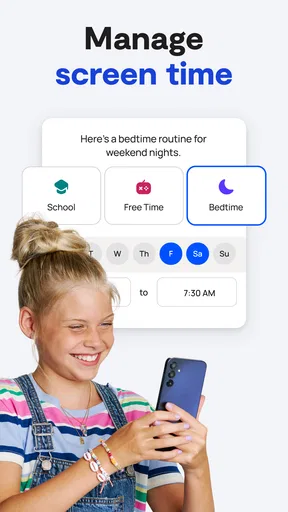
Another cool feature is the screen time management. You can set bedtimes, school times, and even block apps during homework hours. Finally, you can get your kids to focus on their algebra instead of TikTok.
Real-Time Alerts
One thing I love is how Bark doesn't just bombard you with alerts for every little thing. It uses AI to determine what's truly worth your attention. When something fishy pops up, you get a notification with a description of the issue. It’s like having a digital guardian angel whispering in your ear.
Privacy Matters
Now, I know what you’re thinking: "Isn’t this invading my kid’s privacy?" Well, Bark strikes a pretty good balance. It doesn’t snoop into every single message but focuses on detecting potential issues. You get to keep an eye on things without feeling like you’re crossing any lines.
Making alerts useful at home
In a realistic after-school moment, I’d check an alert when I had a quiet minute, then speak with my child privately instead of demanding an explanation in the middle of dinner. That small choice matters: a notification can raise a concern, but a respectful conversation is what reveals whether it was a misunderstanding, a one-off exchange, or a pattern that needs attention. I’d also avoid turning every alert into a consequence, or the child may learn to hide activity rather than ask for help.
A useful habit is to agree on a simple response plan before anything worrying appears: who the child can talk to, when a parent will check in, and what counts as an urgent problem. This keeps the app from becoming the whole safety strategy. It also gives a young person a clearer sense of what monitoring means in practice, which is more constructive than installing controls without explaining them.
Where the trade-offs show up
Although the interface may feel easy to navigate, ease of use does not necessarily make the family setup effortless. Connecting a child’s devices and agreeing on rules takes cooperation, and the usefulness of monitoring depends on the devices and services involved. I’d treat setup as a shared task rather than something to rush through alone. If a child uses an account or device that is not part of the household’s agreed arrangement, the app may not answer the parent’s concern in the way they expect.
There is also a difference between limiting access and changing habits. A bedtime block can create a clear boundary, but it cannot teach a child how to handle peer pressure, upsetting messages, or a difficult conversation online. I’d use controls for predictable household routines and reserve time to talk about judgment, privacy, and asking for help. If those discussions are the main need, family conversations or guidance from a trusted professional may be more appropriate than adding another monitoring layer.
My performance verdict
On balance, I see Bark as a practical safety aid rather than a complete solution. Its combination of concern-focused alerts and screen-time boundaries gives parents more than a basic timer, while its selective approach means families should not expect to inspect every interaction. The app’s usefulness depends less on checking it constantly and more on responding proportionately when it gives you a reason to pay attention.
I’d recommend trying it when online safety is a recurring family concern and both parent and child can talk openly about the purpose of monitoring. I’d skip it if the goal is silent, exhaustive surveillance or if a simple built-in schedule would solve the problem. Used with clear expectations and a willingness to listen, Bark can help a parent notice when a conversation is needed; the human response remains the part that matters most.
Wrapping It Up
All in all, Bark - Parental Controls is a solid choice for parents wanting to ensure their kids’ safety in the wild west of the internet. The peace of mind it offers is priceless. Whether you’re worried about screen time, online predators, or just want to make sure your kid isn't watching cat videos all night, this app has got your back.
If you’re on the fence about giving it a shot, I'd say go for it. After all, in today’s digital world, a little extra vigilance goes a long way.
Pros
- Comprehensive monitoring features.
- Customizable alerts for parents.
- User-friendly interface design.
- Supports multiple devices easily.
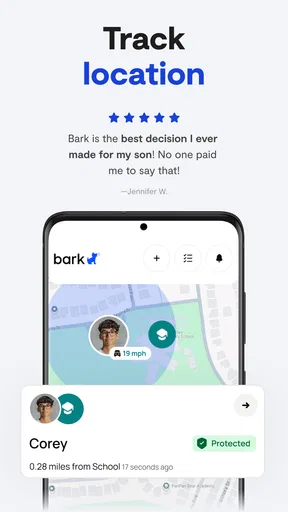
- Real-time location tracking available.
Cons
- Can be pricey for premium features.
- Requires constant internet connection.
- Some features need setup time.
- Limited customization for alerts.
- May drain battery quickly.
FAQs for Bark - Parental Controls
What is Bark - Parental Controls and how does it work?
Bark is a parental control app designed to help parents monitor and manage their children's online activity across various platforms. It uses advanced algorithms to scan texts, emails, and social media accounts for potential risks, alerting parents to concerns like cyberbullying, inappropriate content, and online predators. The app provides timely insights without compromising children's privacy.
Is Bark - Parental Controls compatible with both Android and iOS devices?
Yes, Bark is available for both Android and iOS devices. It supports a wide range of devices, ensuring parents can monitor their children’s activity regardless of the platform. The app is designed to work seamlessly across different operating systems, providing consistent monitoring and alerts.
How does Bark ensure the privacy of my child’s information?
Bark is committed to maintaining the privacy of your child’s information. The app uses secure encryption methods to protect data and only alerts parents to potential concerns without revealing every detail. This approach ensures that children’s privacy is respected while still keeping parents informed about critical issues.
What types of online activities can Bark monitor?
Bark can monitor a variety of online activities, including text messages, emails, and over 30 different social media platforms. It looks for signs of cyberbullying, adult content, suicidal ideation, and more. This comprehensive monitoring helps parents stay informed about potential risks in their child’s digital life.
How user-friendly is Bark for parents who are not tech-savvy?
Bark is designed to be user-friendly, even for parents who may not be tech-savvy. The app offers a straightforward setup process and provides clear, actionable insights through an easy-to-navigate dashboard. Additionally, Bark offers customer support and resources to assist parents in utilizing the app effectively.


